
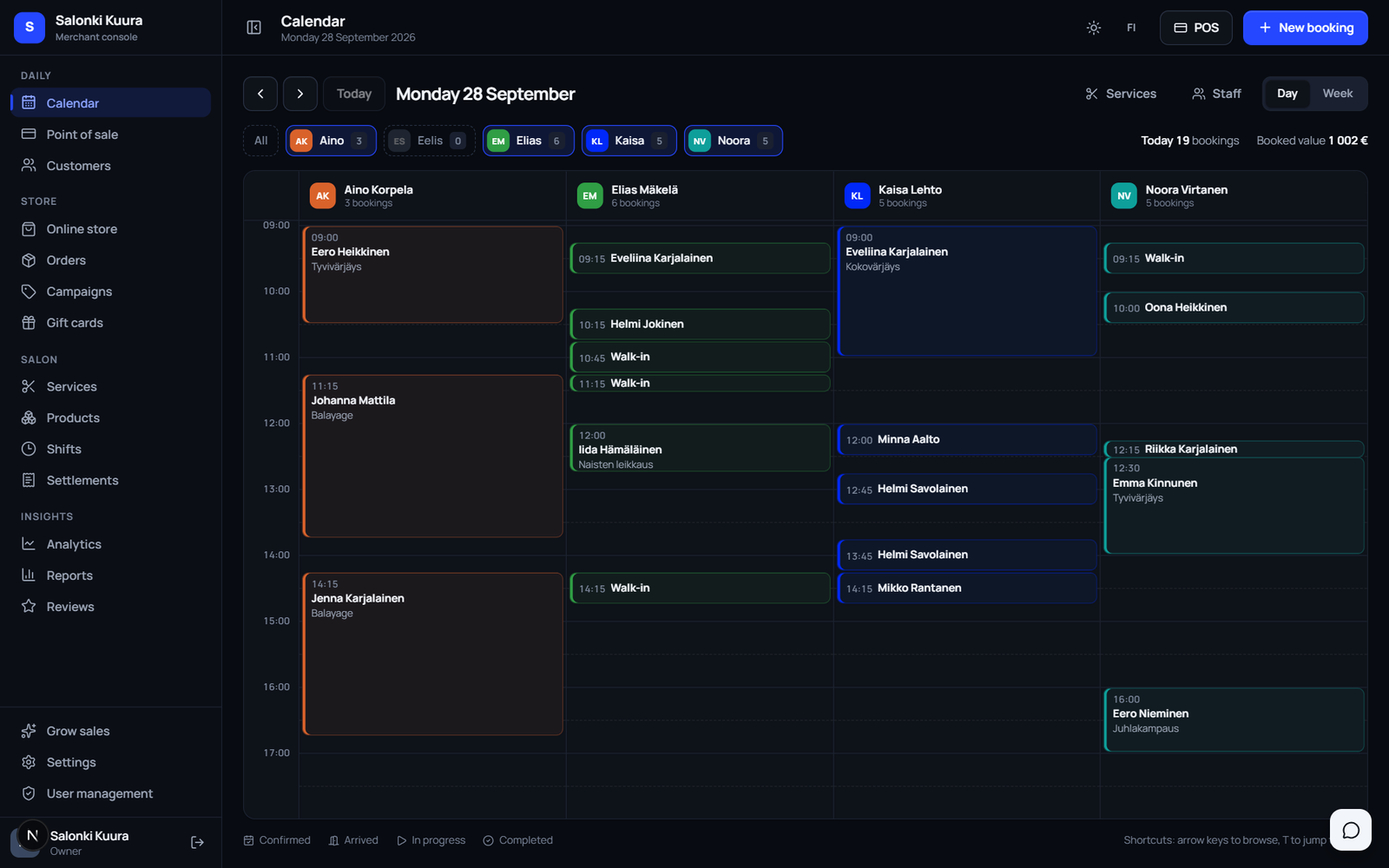
Booking
The day's bookings side by side per employee, or the whole week at once.
- Day and week view
- Booking status: confirmed, arrived, in progress, completed
- Tap an empty slot for a new, pre-filled booking
- Show one or several employees at a time
Our own application for hair salons, barbers and other appointment-based businesses: booking, point of sale, online store, customer records and accounting reports in one place. The app is in its final stage and launches soon. Join the waiting list and hear about the launch first.
The Merchant App already works, and every screenshot on this page is from the current version. They show a fictional demo salon, Salonki Kuura, and no real customer data. We are now finishing the installation and the card terminal and text message setup with real accounts before the app goes on sale.
People on the waiting list hear about the launch first and get into the first installations. Signing up does not commit you to anything.
No more separate booking software, till system and spreadsheet. Every employee sees only the sections they need for their work.
The day's bookings side by side per employee, or the whole week at once.
Your own booking page that you can embed directly on your website.
Customers get a confirmation and a reminder, so appointments are not forgotten.
Services and products in the same view, one receipt at once.
A customer card that shows everything relevant before the customer sits down.
Sell the same products you have on your shelf.
Incoming online orders in one list.
Discount codes for your online store without a separate tool.
You know what is on the shelf and what it cost.
A weekly plan for the whole staff on one page.
Figures come from actual receipts, not estimates.
Commissions for chair renters and contractors, calculated for you.
Sell at the till or online. The card works as payment for all services and products.
Everyone sees only what they need for their work.
Every employee has their own column, and the colour of a booking shows its status. Tap an empty slot and a new booking opens for the right time and employee. The next customer and the day's booked value are shown at the top.
The booking page shows only times that are really free. It reads shifts, existing bookings, the service duration and the booking buffer. Customers get a confirmation by email and can cancel from a link in the message.
Pick the services and products, then pay by card, cash, MobilePay or gift card. The receipt is recorded, products are deducted from stock and the day's sales update in one go.
Reports are built from actual receipts. You see the month's revenue, the share of product sales, customer visits and the average sale, and who sells the most. The data goes to accounting as a CSV file.
The big booking systems charge you from two directions: a monthly fee that grows with your staff, and a share of every card payment. The better you do, the more they get.
The Merchant App does neither. Our plan is one annual fee for the whole business, and card payments go straight to your own Stripe account. We don't see your payment fees and take no share of them. The software runs on your server and the key is yours.
The Merchant App is not a cloud service you rent access to. When the app launches, you acquire a licence to the software, and it is installed in your own environment. We don't host it, we can't access your data and we're not between you and your payments.
Planned price 249 € a year for the whole business. No per-user pricing, no commission on your sales.
The software runs with Docker on your server or computer. You need a machine that is on while the app is used, and about 2 GB of disk space. We do the setup for you.
Customer records, receipts and bookings are in your database. They never pass through us.
Customer records and receipts are in your own database. You can export them any time, also if you stop.
The software backs up its database automatically once a day. Copying it somewhere safe, updates and server maintenance are your responsibility. They can be agreed with us separately.
The licence agreement and the data processing agreement are reviewed and accepted in writing before the software is installed.
The customer register contains personal data. The software is built accordingly. Because it runs in your installation, you are the data controller, not us.
The software sends no data to us. Third parties only receive what you enable yourself, such as card payments to Stripe or reminders to your email and text message service. You decide where the server is.
The software runs behind an encrypted connection. The certificate is installed on your own server.
Passwords are never stored in readable form and cannot be recovered from the database.
The data of each business and each separately created location is isolated on the server: every login sees only its own.
A customer's data can be deleted permanently. Receipts are kept anonymised for accounting.
Permissions are checked on the server with every request, not in the browser.
The screenshots are from the current version of the app. They show a fictional demo salon, Salonki Kuura, and the names and contact details are not real. The same view works in light and dark.
Colour formulas, notes, loyalty points and the whole visit history on one screen.
Barcodes, purchase and sales price, stock levels and alerts for low stock.
Duration, price and which employee performs which service.
Online store orders in one list, shipped with one tap.
Discount codes for the online store with validity periods.
The day's bookings per employee, status shown by colour.
We install the software in your environment and go through it with you. After that it works in a browser on any device, and there are also Windows and Android apps.
The app cannot be bought or downloaded yet. Join the waiting list and we will contact you as the launch approaches and arrange a demo for your situation.
The app is in its final stage. We will not promise an exact date until installation in the customer's own environment and the card terminal and text message setup have been tested with real accounts. People on the waiting list hear about the launch first.
The planned price is 249 € a year for the whole business, excl. VAT. It covers booking, point of sale, online store, customer records, products and inventory, shifts, settlements and reports. The price is the same for one or ten employees, and we take no commission on your sales. We confirm the final price at launch.
The software is installed with Docker on your own server or computer, not in our cloud. You need a machine that is on while the app is used and about 2 GB of disk space. No separate database is needed. It is used in a browser on any device, and there are also Windows and Android apps. We do the installation for you during onboarding.
You do. The customer register, receipts and bookings live in your own database and never pass through us. You are the data controller. You can export your data any time, also if you stop using the software.
Card payments go straight to your own Stripe account, both from the card terminal at the till and from gift cards bought online. You open the account in your own name and agree the fees directly with Stripe. We are not between you and your payments and take no share. Cash and MobilePay are recorded at the till as their own payment methods.
Yes. The customer gets a booking confirmation by email and a reminder before the visit by email or text message, with a link to cancel. Messages are sent from your own service accounts: text messages for example through 46elks, with whom you make the agreement yourself. Nothing is sent until you set it up.
The admin view works in Finnish and English, switchable with a button. The customer booking page and online gift card purchase are in Finnish for now.
Yes. Each location is set up as its own unit, so its bookings, customers and till are kept separate and staff only see their own location. A shared customer register across locations does not exist yet.
The software backs up its database automatically once a day. After onboarding, copying the backups somewhere else, updates and server maintenance are your responsibility, because the software runs in your environment. If you would rather not handle them yourself, they can be agreed with us separately.
Yes. Join the waiting list and we will show you the software remotely, mirrored to your own business, as the launch approaches. The agreement is made in writing only after you have seen what you are buying.
Join the waiting list. We will tell you about the launch and the final price first and arrange a demo when you are ready. Signing up does not commit you to anything.
Or call us directly: +358 46 656 8482 · myynti@nordicsite.fi